CSVCleanMerge Official User Manual
Everything you need to install, automate, and audit messy CSV/TSV files 100% offline on Windows 10 & Windows 11.
1. Quick Start & Installation
CSVCleanMerge ships in two identical Windows builds. Both run 100% locally with zero internet requirement during file processing:
- Microsoft Store Build (Recommended): Signed and packaged for Windows 10/11 with seamless automatic updates and zero SmartScreen warnings.
- Portable
.exeBuild (No Admin Required): A single standalone executable you can place inDownloads,Documents, or a USB drive on locked-down corporate laptops.
.exe before Microsoft SmartScreen builds download reputation, click More info → Run anyway. If your IT department restricts unsigned binaries, choose the signed Microsoft Store build instead.
Test the Engine in 5 Seconds
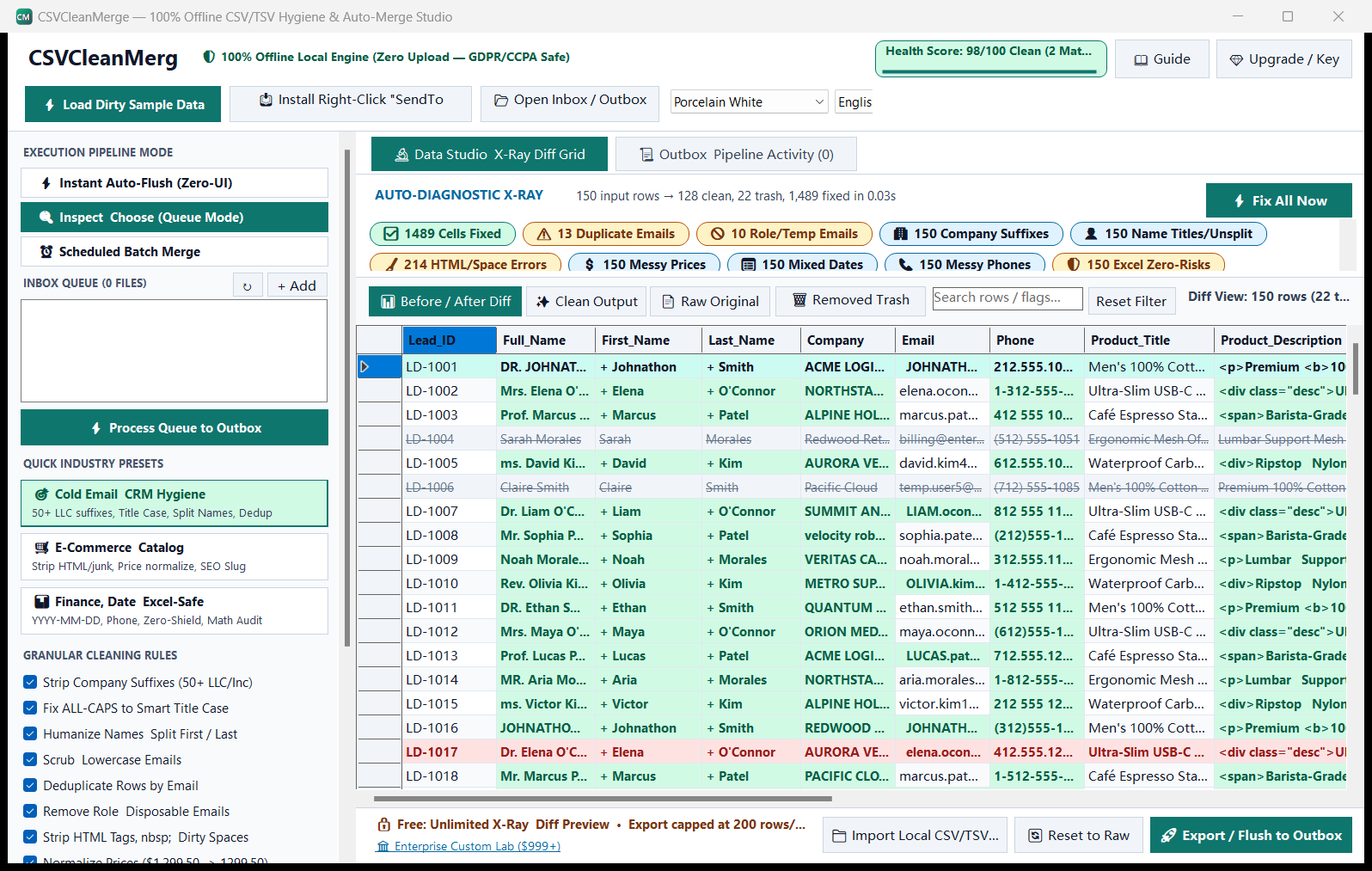
On first launch, click [⚡ Load Dirty Sample Data] in the top-left toolbar. CSVCleanMerge loads a realistic 150-row dirty dataset containing ALL-CAPS company suffixes, unsplit doctor/MBA titles, role emails, dirty HTML product descriptions, and a hidden invoice math discrepancy so you can inspect the X-Ray Diff Grid immediately.
2. The Zero-UI Workflow (Right-Click SendTo & Inbox/Outbox)
You do not need to open Excel or manually browse for files every time you export a CSV from Apollo, Shopify, or your ERP.
- Click Install Right-Click "SendTo Inbox" in the top toolbar. This creates a lightweight Windows shortcut inside
%APPDATA%\Microsoft\Windows\SendTo. - Open Windows File Explorer, right-click any
.csvor.tsvfile, and choose Send to → CSVCleanMerge Inbox. - Windows makes a non-destructive copy into your configured Inbox folder. Your original source file stays completely untouched.
Choosing an Execution Pipeline Mode
- Instant Auto-Flush (Zero-UI — Pro/Team): The moment a file lands in
Inbox, CSVCleanMerge applies your active preset, writes Twin-Files toOutbox, and logs the run in Activity — no clicks required. - Inspect First (Queue Mode): Files queue inside the left Inbox Queue panel so you can preview the X-Ray Diff Grid, toggle granular rules, and click Process Queue to Outbox when ready.
- Scheduled Batch Merge (Pro/Team): Collects multiple CSVs dropped into
Inboxover a schedule (e.g., hourly or end-of-day), aligns headers, merges them into one deduplicated master dataset, and flushes toOutbox.
SendTo are copied into the Inbox staging directory, and cleaned deliverables are always written with fresh timestamps in Outbox.
3. The 3 Industry Presets & Excel Leading-Zero Warning
Select a preset in the left sidebar to toggle the ideal bundle of deterministic cleaning rules in one click:
- Cold Email & CRM Hygiene: Strips 50+ legal company suffixes (
LLC,Inc.,Corp.,GmbH,Ltd.), converts ALL-CAPS to Smart Title Case, strips honorifics/credentials (Dr.,MBA,PhD) while splittingFirst_Name/Last_Name, lowercases & deduplicates emails, and moves role/disposable emails (info@,billing@,noreply@) to Trash. - E-Commerce & Shopify Catalog: Strips HTML tags (
<p>,<div>,<b>) and entities ( ,&), normalizes messy prices ($1,299.50 USD→1299.50), collapses dirty whitespace, preserves SKU leading zeros, and generates clean SEO URL handles. - Finance, Date & Excel-Safe Audit: Standardizes mixed dates (
03/14/2026,16-Mar-2026) to ISOYYYY-MM-DD, normalizes phone numbers and decimals, and runs a deterministic math audit flagging any row whereSubtotal + Tax != Total.
="07911") is OFF by Default
Excel silently strips leading zeros when you double-click a raw CSV (turning ZIP 07911 into 7911). While wrapping values as ="07911" forces Excel to display the zero, CRMs (HubSpot, Instantly) and Shopify importers treat the literal =" characters as corrupted text!Therefore, Excel Formula Wrap is intentionally OFF by default so your CSVs remain 100% pure for API/CRM/Shopify ingestion. Only turn it ON when your final deliverable is meant to be double-clicked directly in Microsoft Excel by a human reviewer. See our Excel Leading-Zero Guide for full details.
4. Understanding Twin-File Output
Every export creates two companion files in your Outbox folder so you have complete auditability:
Outbox/
├── Cleaned_apollo_leads_20261120_1430.csv      # Import-ready UTF-8 BOM + _CleanFlags
└── Removed_Trash_apollo_leads_20261120_1430.csv # Quarantined rows + _RemovalReasonCleaned_*.csv: Ready for direct upload into HubSpot, Instantly, Shopify, or QuickBooks. Includes an optional_CleanFlagscolumn (e.g.,STRIPPED_LLC; SPLIT_NAME; MATH_ERR) showing every automated fix applied to that row.Removed_Trash_*.csv: Contains every deduplicated, empty, or role-email row removed during cleaning, tagged with an exact_RemovalReason(e.g.,Duplicate Email,Role/Disposable Email) so you never lose a legitimate contact.
5. Licensing, 3-Day Trial & Team SOP Recipes
Click Upgrade / Key in the top-right corner of CSVCleanMerge to manage your tier:
- 3-Day 500-Row Emergency Trial: Available in 1 click directly inside the Free edition (no credit card or email required) when you need to clean a medium-sized list immediately.
- Activating Paid Keys: Paste your one-time license key starting with
CCM-PER-(Personal, 5,000 rows),CCM-PRO-(Pro, unlimited rows + SendTo/Auto-Merge), orCCM-TEAM-(Team, 5 devices + SOP Recipes & Audit Certificates). Activation verifies locally offline. - Sharing Team
.tcrecipeSOP Files: Team users can export their exact preset, rule checkboxes, and column mappings to a portable.tcrecipefile and share it over Slack, Teams, or Git so every analyst runs the identical data-hygiene SOP. - Printable HTML / PDF Audit Certificates: Team users can generate a timestamped HTML Audit Certificate summarizing input row count, cells fixed, rows quarantined, and math discrepancies — press
Ctrl+Pin your browser to save as a signed-off PDF for compliance records.
6. Troubleshooting & Offline Privacy FAQ
How do I split a 50,000+ row CSV for CRMs with upload limits?
Pro and Team users can enable the Chunk Splitter before exporting (e.g., 5,000 or 10,000 rows per file). CSVCleanMerge automatically repeats the header row at the top of each part (_part01.csv, _part02.csv) while keeping UTF-8 BOM encoding intact.
Why do accented names look garbled in Excel?
Ensure UTF-8 BOM output is enabled (on by default). The Byte Order Mark tells Microsoft Excel to decode UTF-8 characters (é, ñ, ü, €) properly on double-click.
How do I uninstall the Right-Click SendTo shortcut?
Open %APPDATA%\Microsoft\Windows\SendTo in Windows File Explorer and delete the CSVCleanMerge Inbox.lnk shortcut, or click the uninstall toggle inside the app's Inbox/Outbox menu.
Does CSVCleanMerge phone home or send telemetry?
No. CSVCleanMerge executes 100% offline. Your CSV contents, headers, and filenames never leave your local Windows drive. Read our full Offline Privacy Policy or email support@csvcleanmerge.com with any questions.